


Description
Download Easy System Utility – Free Windows Optimization Tool for Performance & Cleanup
Easy System Utility is a powerful, lightweight software designed to simplify system optimization and maintenance for Windows 10 and 11 users. This free tool offers a centralized dashboard that provides instant access to detailed hardware and system information, including CPU model, GPU specs, RAM usage, motherboard details, network configuration, and driver versions. Beyond monitoring, it excels in cleaning up junk files, temporary data, and system clutter, helping users reclaim valuable disk space and boost system responsiveness. With its intuitive interface and automated cleanup features, Easy System Utility is ideal for both beginners and advanced users seeking a secure, reliable way to maintain peak performance on their Windows devices.
Comprehensive System Monitoring Made Simple
One of the standout features of Easy System Utility is its ability to deliver a complete overview of your Windows system in real time. Unlike traditional tools that require navigating through multiple Control Panel menus or third-party utilities, this software consolidates all essential hardware and software data into a single, easy-to-read interface. Whether you're troubleshooting a performance issue, preparing to upgrade your PC, or simply curious about your system's specs, Easy System Utility provides instant access to critical details such as the operating system version, CPU model, GPU type, installed RAM, motherboard manufacturer, and network adapter information.
Additionally, the tool displays active driver versions and highlights outdated or missing drivers, making it easier to keep your system up to date. This is particularly helpful for users who aren’t tech-savvy and may not know how to manually check driver status. The system health monitoring also includes real-time memory usage, disk space allocation, and network activity, allowing users to detect bottlenecks before they become serious problems. The clean, modern design ensures that even complex data is presented clearly, with visual indicators for high usage or potential issues.
What sets this utility apart is its seamless integration with Windows. It runs quietly in the background without consuming excessive resources, and updates are automatic and non-intrusive. You can access the dashboard with a single click, making it a go-to tool for regular system checks. For those who frequently build or maintain PCs, this feature alone makes Easy System Utility an indispensable part of their toolkit.
Effortless File Cleanup & Disk Optimization
Over time, Windows accumulates a significant amount of temporary files, cache data, and redundant system files that can slow down performance and consume valuable storage space. Easy System Utility tackles this issue head-on with a smart, automated cleanup engine designed to identify and remove unnecessary files safely and efficiently. The tool scans for common clutter such as temporary internet files, Windows Update leftovers, Recycle Bin contents, and DirectX Shader Cache files—elements that are often overlooked by standard disk cleanup tools.
What makes the cleanup process user-friendly is the intelligent filtering system. Instead of blindly deleting everything, the software categorizes files by type and size, allowing users to review what will be removed before confirming. This transparency ensures that no critical system files are accidentally deleted, maintaining the stability of your operating system. The tool also includes a quick cleanup mode for users who want a fast refresh without diving into settings.
Moreover, Easy System Utility supports scheduled cleanups, so you can set it to run automatically every week or after every major update. This proactive approach prevents clutter from building up over time. For users with limited disk space—especially those on SSDs or older machines—this feature can free up several gigabytes of storage with just a few clicks. The software also provides a detailed report after each cleanup, showing how much space was recovered and which file types contributed the most. This level of insight empowers users to make informed decisions about their storage habits.
Compatibility, Installation & User Experience
Easy System Utility is designed with broad compatibility in mind, supporting all major versions of Windows, including Windows 10 and Windows 11 (both 32-bit and 64-bit editions). It is also compatible with Windows Server environments, making it a versatile choice for both personal and professional use. The installation process is straightforward and takes less than a minute. Simply download the installer from the official website, run it, and follow the on-screen prompts. There are no bundled third-party applications or intrusive ads—just a clean, secure installation.
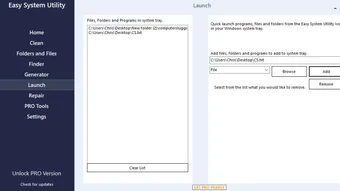
Once installed, the app launches quickly and integrates smoothly into the system tray. It doesn’t require administrator privileges for basic operations, although some advanced features like driver checks may need elevated permissions. The interface is intuitive, with clearly labeled tabs for system info, cleanup, and settings. Even first-time users can navigate the tool without confusion. The responsive design ensures smooth performance, even on older hardware.
For those who prefer a portable version, Easy System Utility offers a standalone executable that can be run from a USB drive without installation—ideal for troubleshooting or optimizing systems on the go. This flexibility enhances its usability across different environments, whether at home, in the office, or during tech support tasks. Regular updates are released to improve stability, add new features, and ensure compatibility with the latest Windows updates.
Pros & Cons at a Glance
- Pros:
- Centralized system monitoring with real-time hardware and network data
- Safe, smart cleanup with file preview and selective deletion
- Lightweight and fast—minimal impact on system performance
- Free to download and use with no hidden costs
- Supports Windows 10, 11, and Windows Server
- Automatic updates and scheduled cleanup options
- Portable version available for on-the-go use
- Cons:
- Limited advanced customization for experienced users
- No built-in backup or restore functionality
- Only available for Windows platforms (no Mac or Linux support)
- Basic interface may feel too simple for power users
- Doesn’t integrate with cloud storage cleanup
Frequently Asked Questions (FAQ)
Is Easy System Utility safe to use?
Yes, Easy System Utility is completely safe and secure. It uses trusted system APIs to access hardware and file data without modifying critical system files. The software is virus-free, ad-free, and does not collect personal data. It has been tested across multiple Windows environments and is regularly updated to maintain security standards.
Can I use it on Windows 11?
Absolutely. Easy System Utility is fully compatible with Windows 11, including both 64-bit and 32-bit versions. It has been optimized to work seamlessly with the latest Windows features and interface changes.
Does it delete important system files?
No. The tool only targets temporary, cache, and junk files that are safe to remove. It includes a preview feature so you can review each file category before deletion, ensuring no essential data is lost.
Is there a portable version?
Yes, a portable version is available. It runs directly from a USB drive without installation, making it perfect for system diagnostics or cleanup on multiple machines.
How often should I run the cleanup?
We recommend running the cleanup once a week or after major Windows updates. The scheduled cleanup feature can automate this process to keep your system optimized without manual effort.
Final Verdict: A Must-Have Free Tool for Windows Users
Easy System Utility stands out as one of the most reliable and user-friendly tools for Windows optimization and system maintenance. With its powerful system monitoring, intelligent file cleanup, and seamless integration with Windows 10 and 11, it delivers real value without complexity. Whether you're a casual user looking to free up space or a tech enthusiast managing multiple systems, this software provides a secure, efficient, and free solution.
While it lacks some advanced features found in premium tools, its simplicity and reliability make it an excellent choice for everyday use. The fact that it’s completely free, regularly updated, and safe to use makes it a standout option in the crowded utility software market.
Ready to boost your system’s performance? Download Easy System Utility today and enjoy a faster, cleaner, and more responsive Windows experience—no cost, no hassle, just results.
Review by: TechReview Pro
Rating: 4.6 out of 5
Date: April 5, 2025
Guides & Tutorials for Easy System Utility
How to install Easy System Utility
- Click the Preview / Download button above.
- Once redirected, accept the terms and click Install.
- Wait for the Easy System Utility download to finish on your device.
How to use Easy System Utility
This software is primarily used for its core features described above. Open the app after installation to explore its capabilities.
User Reviews for Easy System Utility 0
No reviews found





